IE 4531: Subtractive Manufacturing Lab
CNC Machining with the Emco Concept Mill 105
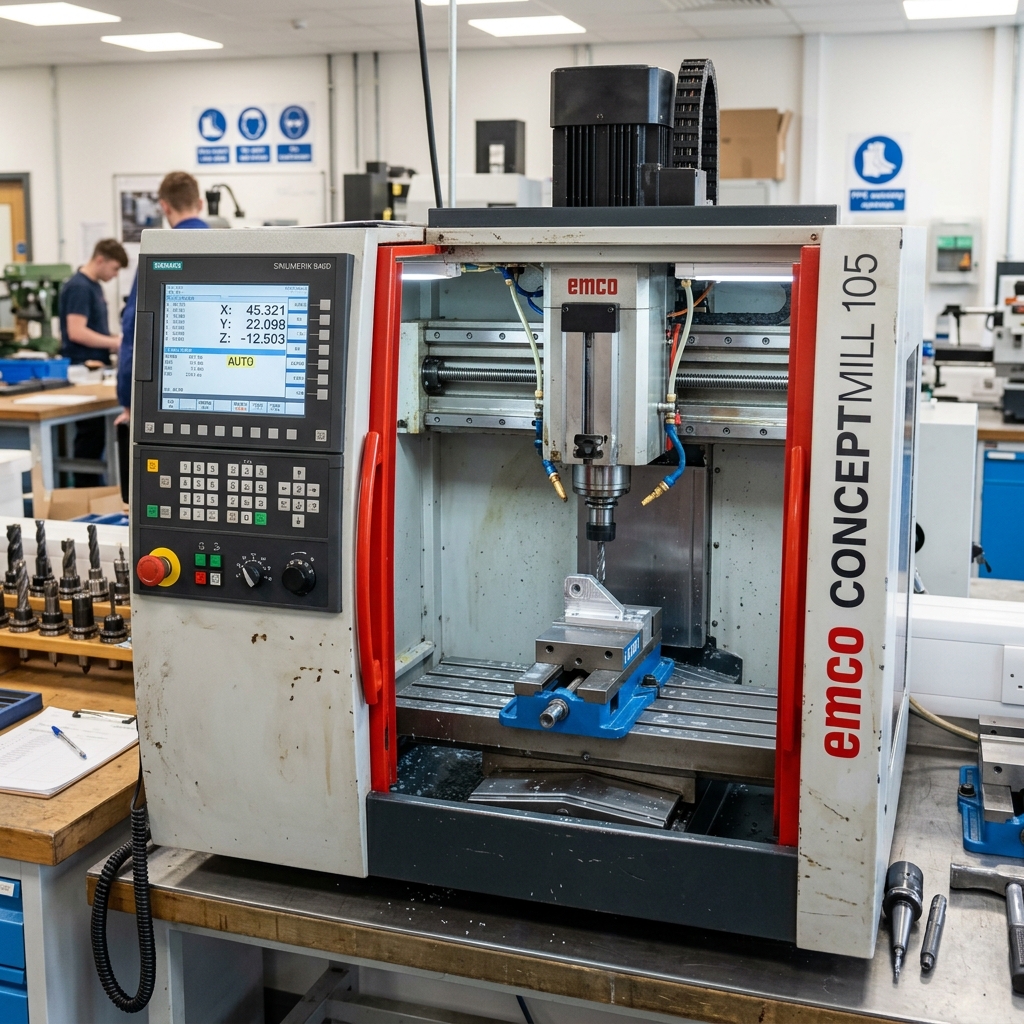
Master the fundamentals of Computer Numerical Control (CNC) and precision manufacturing.
Think of it like sculpting - we start with a block of material and precisely remove what we don't need to create the final part. It's the engine behind modern industrial production.
🎯 Today's Goals
What you will master in this session
Operating the Mill
Learn to control the Emco Concept Mill 105 interface and manual controls.
Programming
Write G-code and use Fusion 360 CAM to generate toolpaths.
Precision
Set work coordinates and measure tool offsets with micrometer accuracy.
⚠️ Critical Safety Rules
Read this CAREFULLY - Safety is non-negotiable
🚨 Rule #1: Never Operate Alone
Do NOT touch or operate any machine without a lab technician or TA present. Unauthorized operation can lead to serious injury or catastrophic machine damage.
Safety Glasses
Must be worn at all times in the lab area. Flying chips and coolant present constant hazards.
Closed-Toe Shoes
Required (leather preferred). Protects your feet from falling tools or heavy workpieces.
👕 Proper Shop Attire
Dress for the environment
| Item | Requirement | Reasoning |
|---|---|---|
| Hair | Tie back long hair securely | Rotating spindles can catch hair instantly |
| Jewelry | NO rings, watches, or necklaces | Conductive and snagging hazards |
| Pants | Long pants (no shorts) | Protects against hot metal chips |
| Sleeves | Short or tight-fitting sleeves | Prevents entanglement in moving parts |
💡 NOT properly dressed? You will NOT be allowed to participate in the lab session.
🚫 Never Do These Things
Zero tolerance for these actions
Open the door while the machine is running.
Blow air directly into the spindle or ways.
Leave the machine running unattended.
📐 The Three Axes
Understanding the 3-axis CNC coordinate system
- ↔️ X-Axis: Left-right movement of the table.
- ↕️ Y-Axis: Front-back movement of the table.
- ⬆️ Z-Axis: Up-down movement of the spindle tool.
Cartesian Coordinate System
🛠️ Machine Components
Heart of the Emco Concept Mill 105
Milling Spindle
1.1 kW motor spinning up to 5,000 RPM. Holds the SK30 tool holders.
Milling Table
420x125mm surface with T-slots for secure workholding.
Control System
Siemens/WinNC PC-based control managing all logic and movement.
🔄 Automation & Movement
Automatic tool changes and precision slides
Tool Drum (ATC)
Holds 10 tools. The machine switches tools automatically using logic that finds the shortest path.
Precision Slides
Driven by stepper motors and ball screws to position within 0.0015mm tolerance.
📍 Zero Points
Navigating the workspace
Machine Zero (M)
Fixed by the manufacturer. The absolute boundary of the machine's travel.
Reference Point (R)
Point used to calibrate the axes every time you power on (Homing).
Work Zero (W)
Set by YOU on the workpiece. Makes your code much easier to read!
🚀 Startup Procedure
Bringing the machine to life safely
Power On: Switch the main breaker and launch WinNC software.
AUX ON: Hold for 1 minute to power the drives and lubricate the slides.
Reference (Homing): Hit "REF POINT". Axes MUST move to home before any other operation.
🎮 Manual Jogging
Direct control of machine movement
Use the axis keys (+X, -X, etc.) to move the machine manually.
Start SLOW
Always use the 10% or 25% override when approaching the workpiece.
Avoid Collisions
Watch the tool tip carefully. Don't rely on software limits to stop you.
Hand on E-Stop
Keep your free hand ready to hit Emergency Stop if you misjudge distance.
📜 G-Code Fundamentals
The language of CNC machines
| Command | Action | Description |
|---|---|---|
| G00 | Rapid Linear Move | Moving from A to B as fast as possible (no cutting). |
| G01 | Linear Feed Move | Controlled movement at a specific speed (cutting). |
| M03 | Spindle On | Starts the spindle rotating clockwise. |
| S and F | Speed & Feed | S defines RPM, F defines Feed Rate in mm/min. |
🖥️ Integrated CAM
From CAD Design to G-Code with Fusion 360
1. Setup
Define material (stock) size and work origin.
2. Toolpaths
Select operations: Facing, Adaptive Clearing, Contouring.
3. Simulate
Virtually "cut" the part to check for crashes or errors.
4. Post-Process
Export the code specifically for THE WinNC controller.
🏁 The First Run
Verification before production
✅ The Dry Run Method
Before cutting actual material, run the program with the spindle OFF and the tool 25mm ABOVE the part (Z-Offset). Check that move movements match your expectations.
- Verify Tooling: Ensure the right tool is in the right drum slot.
- Workholding: Check that the vise is tight and clamps won't be hit.
- Feed Override: Start with your dial at 10% or 25%.
- Stop & Shutdown: Clean chips and remove tools when finished.
🔨 Tooling & Holders
SK30 Integrated System
Collet Holders
Uses ESX 16 collets to grip round shank tools from 0.5-10mm.
Shell Arbors
Used for larger face mills (up to 40mm) for flattening surfaces.
Tap Holders
Special "float" holders for cutting threads without breaking taps.
✅ Lab 2 Complete
Ready for hands-on machining
Today's Key Principles:
1. Safety First: Eyes protected, attire correct, TA supervised.
2. Setup Matters: Clean tool holders and rigid workholding.
3. Verify Twice: Dry run your code before cutting metal.
4. Precision: Respect the +/- 0.005mm accuracy.